
Saturday, 25 February 2012
Design Changes
I decided to make a few changes while in the modelling process. I decided to add a hook to one of his hands opposed to fingers to make him a little more evil looking. It also opens up the possibilities for his back story into how he lost part of his hand.


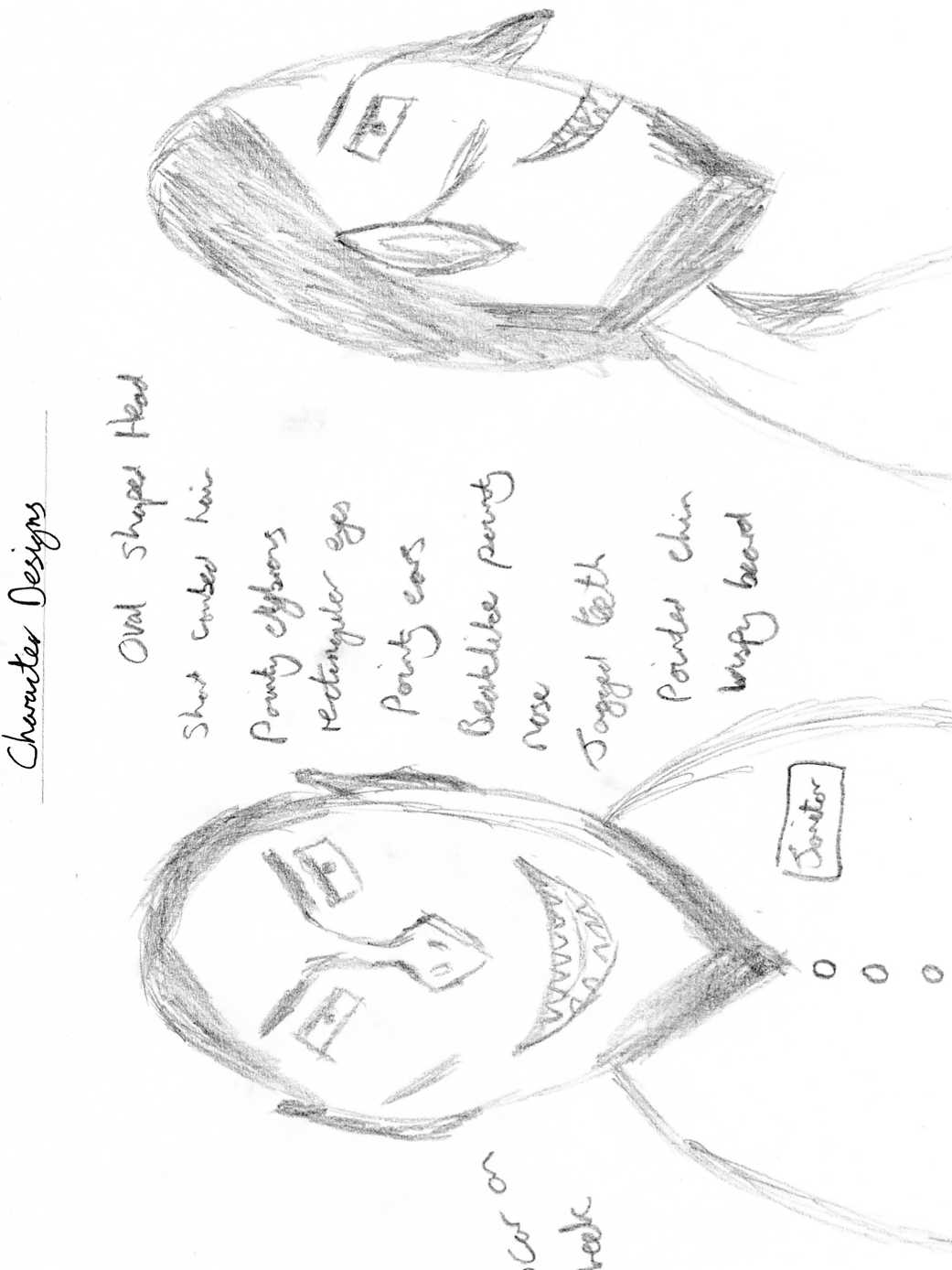
Intial Designs
Below are some drawings detailing what I think my Villain may look like once the modelling process has started: Each drawing contains labels to point out more obscure information that is hard to obtain from the drawing itself.



Sunday, 19 February 2012
Basic Character Tutorial
I have created a basic person before, but it was a rather rushed and simple attempt. To start create a box and assign a number of segments to the different regions and convert the box to an editable poly. Next highlight the top left and top right vertices and pull those outwards a little to create the shoulder blades. Move down and select the bottom left and right vertices and pull them upwards a little to create the pelvis.
Next switch to the polygon selection mode and select the polygon to extrude the arms and the legs. Switch between the extrude tool and the bevel tool to create bumpy looking arms and legs which should make them look a little more real. This will help making the biceps and triceps look bigger than the forearm and the quadriceps bigger than the rest of the leg.
Next use the bevel tool to extrude the neck out a little and then bevel it open to create a space for the head. Bevel it round to round off the head once it looks big enough for the body.

Adding bones to the person is also quite a simple method. Simply add bones to the person you created starting off with the spine and working the way through the body. Make sure that all of the bones are contained within the mesh of the person then select the skin modifier. This will attach the mesh to the bones. If the skin modifier doesn’t work apply the physique modifier and use the envelope option to even out the mesh to the bones.

Tutorial Cartoon Eyes
Creating a cartoon eye turned out to be much simpler than I first thought. To start create a sphere and under the parameter rollout move the hemisphere up a little to form the pupil of the eye. Clone the sphere and increase the radius slightly and take the hemisphere up a little more to form the eyelid. Clone the upper eyelid and rotate the sphere round to form the lower eyelid.


In the material editor chose a standard material – multi sub object and set the number to two. Make one material black and the other white to form the colour of the pupils and the cornea then drag this new material to the first sphere.

In the create panel choose space warps – geometric/deformable FFD box. Click and drag the FFD box around the eye and set number of points to two. Go to bind which is located on the toolbar next to link/unlink which will allow you to select points on the eye which can be moved around.

Reaction to Brief
Upon reading the brief my first thought was excitement about creating a 3D villain aimed at children aged 7-11. I have already created a basic 3D character in the past, but not one that will require a sufficient amount of detail to show off the villain profile. I also started thinking about the techniques that I would need to use and found myself coming up with a few questions. Such as how would I do cartoon style eyes and what sort of new tools would I be using? When using 3DS Max I love finding new tools to use because there are just so many different ones that are suitable for different purposes.
Immediately I started thinking of ideas that would be suitable for the age range for children, checking that they were appropriate. At first I was thinking of something alien based but decided against it after a short while due to finding it hard to come up with a basic villain profile for it. In the end I decided on an evil janitor who works in the police station. My next task is to start coming up with a background for this evil character and also researching villains from films and cartoons so that I can start design and storyboarding.
Thursday, 2 February 2012
Villian Research
Below is a mood board showing a handful of villains, including a mixture of cartoon and feature film villains:

all of these villains have a few similarity's whether they are trying to take over the world or just want revenge on someone.
Firstly the eyes, they are usually either wide open and crazy looking giving the impression that the villain is completely insane, or the eyes are slits giving the impression that they are intelligent and calculating. Sometimes there is a mix between the two types, at one particular moment they could experience a particularly over the top crazy session which shows just how mental they can be. at another moment they could narrow their eyes, thinking and calculating their next move, making them just as dangerous. Both these types have there own advantages, the wide-eyed crazy villain doesn't think of the consequences of their actions, preferring to lash out as hard and fast as they can showing no limit to what they will do. The calculating villain spends more time thinking about their moves and how to cause maximum chaos while trying to avoid the attention.
http://www.youtube.com/watch?v=ySGod3QKEIc

Jafar, Disney villain from Aladdin, is more the narrowed-eyed calculating villain, constantly thinking and planning but also experiencing a few moments were he looks wide-eyed and crazy. The eyebrows are also rather high on the head and are at an obvious angle when looking head on moving diagonally as the eyebrow moves from the nose out towards the top of the eye. this really brings out an evil side when the eyes are narrowed as the eyebrows look very threatening almost like wings from a bird of prey. He is quite tall making him tower over others as though he is some sort of god with long boney fingers making him almost skeleton like. And then there is the colour scheme which is mostly made up of black and red, emphasising darkness, danger, anger and evil.
http://www.youtube.com/watch?v=iv-VlJnDvuw&feature=mfu_in_order&list=UL

Hades, villain from Hercules, is much more of a crazy villain than a patient and calculating one. the narrowed eyes appear more when angry rather than calculating the next move. Like Jafar he has a long thin face, almost inhuman, with long boney fingers giving a skeleton look. He has yellow eyes and pointed teeth making him look rather grotesque. He is completely obsessed with power and doesn't care how he goes about getting it. He has a blue flame for hair which also gives off a much colder side to the villain, showing he has no conscience for his actions, but the flame turns orange when he gets angry to show the more angry and inflamed side he has. He wears a black robe which can indicate death, darkness and evil. as he moves he glides along the floor with black wisps of flame moving around his feet and also likes waving his arms around as though trying to explain something to someone and becoming impatient that they are still not getting it.

all of these villains have a few similarity's whether they are trying to take over the world or just want revenge on someone.
Firstly the eyes, they are usually either wide open and crazy looking giving the impression that the villain is completely insane, or the eyes are slits giving the impression that they are intelligent and calculating. Sometimes there is a mix between the two types, at one particular moment they could experience a particularly over the top crazy session which shows just how mental they can be. at another moment they could narrow their eyes, thinking and calculating their next move, making them just as dangerous. Both these types have there own advantages, the wide-eyed crazy villain doesn't think of the consequences of their actions, preferring to lash out as hard and fast as they can showing no limit to what they will do. The calculating villain spends more time thinking about their moves and how to cause maximum chaos while trying to avoid the attention.
http://www.youtube.com/watch?v=ySGod3QKEIc
Jafar, Disney villain from Aladdin, is more the narrowed-eyed calculating villain, constantly thinking and planning but also experiencing a few moments were he looks wide-eyed and crazy. The eyebrows are also rather high on the head and are at an obvious angle when looking head on moving diagonally as the eyebrow moves from the nose out towards the top of the eye. this really brings out an evil side when the eyes are narrowed as the eyebrows look very threatening almost like wings from a bird of prey. He is quite tall making him tower over others as though he is some sort of god with long boney fingers making him almost skeleton like. And then there is the colour scheme which is mostly made up of black and red, emphasising darkness, danger, anger and evil.
http://www.youtube.com/watch?v=iv-VlJnDvuw&feature=mfu_in_order&list=UL
Hades, villain from Hercules, is much more of a crazy villain than a patient and calculating one. the narrowed eyes appear more when angry rather than calculating the next move. Like Jafar he has a long thin face, almost inhuman, with long boney fingers giving a skeleton look. He has yellow eyes and pointed teeth making him look rather grotesque. He is completely obsessed with power and doesn't care how he goes about getting it. He has a blue flame for hair which also gives off a much colder side to the villain, showing he has no conscience for his actions, but the flame turns orange when he gets angry to show the more angry and inflamed side he has. He wears a black robe which can indicate death, darkness and evil. as he moves he glides along the floor with black wisps of flame moving around his feet and also likes waving his arms around as though trying to explain something to someone and becoming impatient that they are still not getting it.
Subscribe to:
Posts (Atom)